


How to Insert or Type the Delta Symbol in Excel (7 Ways to Insert Δ or δ)
Insert or Type the Delta Symbol in an Excel Worksheet by Avantix Learning Team | Updated September 18, 2024 Applies to: Microsoft® Excel® 2016, 2019, 2021 and 365 (Windows) You can insert or type the Delta symbol in Excel worksheets using built-in commands or keyboard...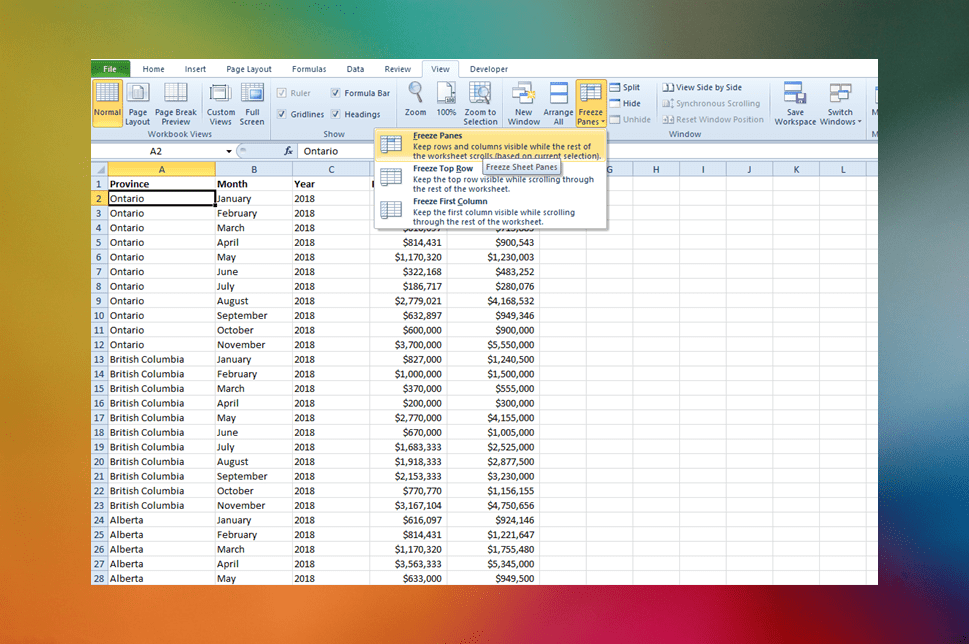
How to Freeze Row and Column Headings in Excel Worksheets
Easily Freeze Row and Column Headings in Excel by Avantix Learning Team | Updated October 25, 2022 Applies to: Microsoft® Excel® 2010, 2013, 2016, 2019, 2021 and 365 (Windows) As many Excel worksheets can become quite large, it can be useful to freeze row and column...
How to Insert or Type the Degree Symbol in Excel (5 Ways to Insert °)
Insert the Degree Symbol in Microsoft Excel by Avantix Learning Team | Updated February 27, 2026 Applies to: Microsoft® Excel® 2016, 2019, 2021, 2024 and 365 (Windows) You can insert or type the degree symbol in Excel using built-in commands, keyboard shortcuts or a...
How to Use Flash Fill in Excel (4 Ways with Shortcuts)
4 Ways to Use Flash Fill in Excel to Extract, Combine, Clean or Format Data by Avantix Learning Team | Updated February 26, 2026 Applies to: Microsoft® Excel® 2016, 2019, 2021, 2024 or 365 (Windows) You can use Flash Fill in Excel to extract, combine, clean or format...
How to Hide or Unhide Excel Worksheets (and Unhide All Sheets)
Hide or Unhide Excel Worksheets by Avantix Learning Team | Updated September 14, 2023 Applies to: Microsoft® Excel® 2010, 2013, 2016, 2019, 2021 and 365 (Windows) You can hide or unhide Excel worksheets using the Ribbon, the right-click menu or keyboard shortcuts. If...Follow Us


